 ReePhly
iPhone keyboard
AI Grammar Keyboard
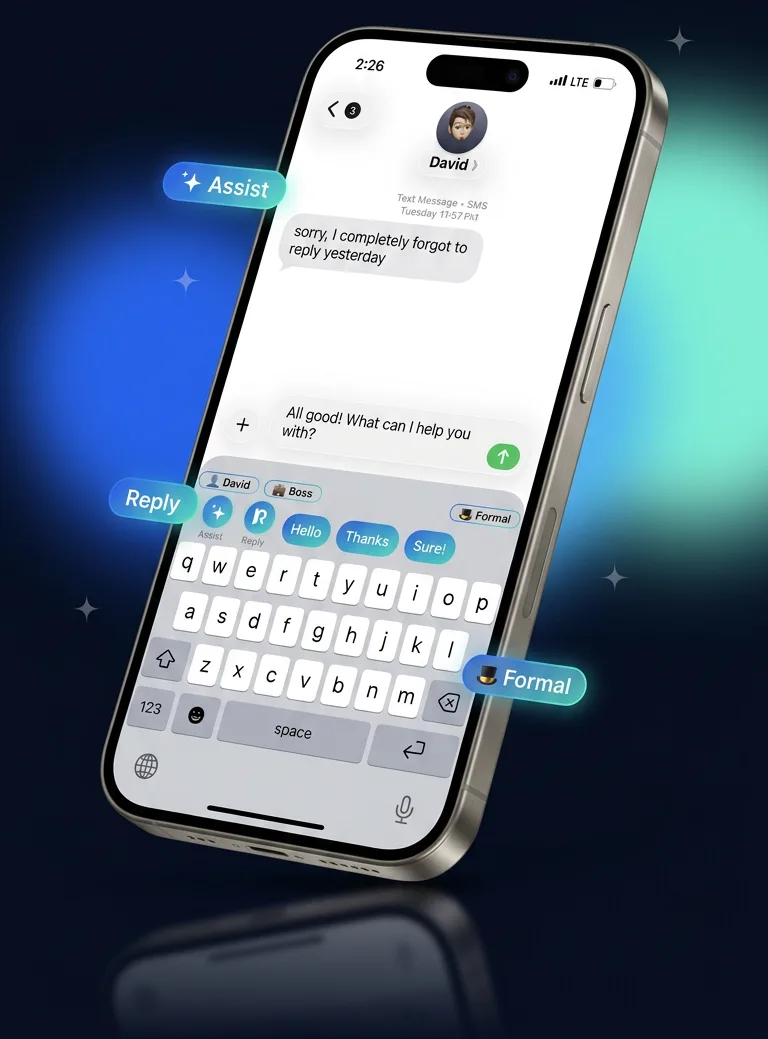
An AI grammar keyboard app is a phone keyboard that checks and rewrites your writing inside the apps you already use. ReePhly is that keyboard for iPhone. Spelling stays on the device as you type. When you tap Assist or Reply, Claude corrects grammar, adjusts tone, or drafts a reply in Messages, Mail, and anywhere else you type.
How does an AI grammar keyboard work on iPhone?
You add ReePhly as a keyboard in Settings, turn on Allow Full Access, and switch to it with the globe key. Spelling stays on the iPhone while you type. Claude corrects grammar, adjusts tone, or drafts a reply only when you tap Assist or Reply.
The keyboard works in the apps you already open. There is no separate chat to paste into. After the one-time keyboard setup, the globe key brings ReePhly up in Messages, Mail, Notes, and other apps that use the system keyboard.
What stays on your iPhone?
Spelling, predictive text, and word completion run on the device while you type. That text is not uploaded. If a cloud request cannot run, for example because you are out of tokens, common spelling and contraction fixes can still be applied on the device. A chip in the keyboard shows whether a suggestion stayed on the phone or was sent for AI.
What happens when you tap Assist or Reply?
Assist sends the draft you choose so Claude can fix grammar, adjust tone, or rewrite it. Reply uses a message you copied and drafts an answer. If you tagged who you are texting, the draft can follow the relationship, writing notes, and example messages you saved for that person. Nothing is sent to Claude until you tap. The ReePhly homepage shows the same two actions: Assist for what you wrote, Reply for what you received.
Is ReePhly free?
Yes. ReePhly is free to download and the free plan is 0 USD. On-device spelling is included, and Claude Assist and Reply use tokens you can refill by watching a short ad. Optional Pro starts at 4.99 USD per month.
What does the free plan include?
The free plan includes on-device spelling, plus Claude Assist and Reply using tokens. Wind a collectible, which plays a short rewarded ad, and you receive 5 tokens. You can wind as often as you like. The free plan is ad supported. You do not need a card to start.
What does Pro cost?
Pro is 4.99 USD per month, or 39.99 USD per year. Lifetime Pro is 99.99 USD once and does not renew. Pro removes ads and the token meter, and it allows longer writing instructions (300 words). Monthly and yearly plans are billed by Apple. Manage them in Settings, your name, then Subscriptions. If a purchase does not show up, the support page covers Restore Purchases and Lifetime Pro.
How is it different from Grammarly Keyboard?
ReePhly keeps ordinary spelling on your iPhone and calls Claude only when you tap Assist or Reply. You can tag who you are texting so a reply can follow that relationship. It is a keyboard inside the apps you already use, not a separate document editor.
Grammarly Keyboard is another way to get writing help on iPhone. ReePhly is built for the moment you are already in a conversation: fix the sentence you typed, or answer the message you just copied, without opening a second app.
When does the check run?
ReePhly does not send each keystroke to a model. You type with on-device spelling, then you choose a tap: Assist for the words you wrote, or Reply for a message you copied. That is the request Claude sees. Before a cloud request, the keyboard scans on the device for obvious secrets, such as card numbers or passwords, and blocks those requests so the text never leaves the phone.
Who is the reply written for?
You can tag the person you are texting and save a relationship, writing notes, and example messages. A reply to a boss can follow different notes than a reply to a friend. Those contact details stay on your iPhone unless you turn on optional backup, which stores a locked copy ReePhly cannot read. The draft you submit for Assist or Reply is still sent to Claude so it can write the suggestion. The privacy policy names Anthropic as the model provider and explains what is stored.
How do I set up the ReePhly keyboard?
Open Settings, go to General, Keyboard, Keyboards, tap Add New Keyboard, and choose ReePhly. Then turn on Allow Full Access so Assist and Reply can reach Claude. The setup guide walks through each screen. Setup takes about a minute.
If Allow Full Access will not stay on, or tokens and Pro look wrong, email support@reephly.ca from the contact page or start with the support answers.