 ReePhly
In the app
Fix Grammar with AI
To fix grammar with AI on iPhone, write in the app you already have open, then tap Assist. ReePhly is the keyboard under Messages, WhatsApp, Mail, and other apps. Spelling runs on the phone as you type. Claude corrects the draft only after you tap Assist. You do not paste the sentence into a website first.
How do I fix my grammar with AI on iPhone?
Open the conversation and switch keyboards
Stay in Messages, WhatsApp, Mail, or any other app that uses the iPhone keyboard. The globe key brings ReePhly up. You add it once in Settings. You do not leave the thread to open a checker site.
Write the sentence you mean to send
Spelling, predictive text, and word completion run on the device while you type. That layer is local. A full grammar correction is a separate step, and it waits until you ask for it.
Tap Assist, then Apply if you agree
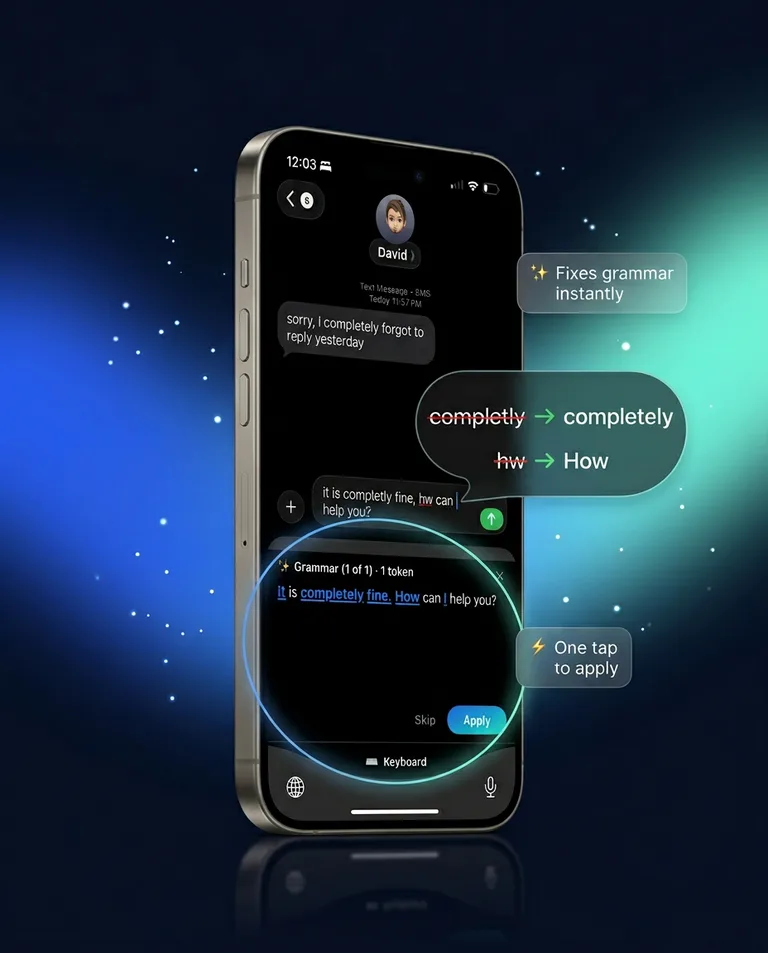
Assist takes the draft you wrote and asks Claude to fix grammar. You review the suggestion and apply it in the same keyboard. Reply is the other button, for a message you copied. This page is about the sentence you typed.
Do I need to copy my text into another app?
No. The field you are already typing in is the place the correction happens. Messages, WhatsApp, and Mail all use the iPhone keyboard, so the same Assist tap is available once ReePhly is the active keyboard. There is no second window and no website form.
What if the sentence is in Notes or somewhere else?
Same path. If the app uses the system keyboard, the globe key can switch to ReePhly there too. The correction is tied to the keyboard, not to one chat app.
What does a correction look like?
This pair is an illustration written for this page. It is not a customer quote, and it is not a transcript of a suggestion the app returned.
Before
I completly forgot the file. Can you hw me the link?
After
I completely forgot the file. Can you send me the link?
Is my typing sent anywhere?
Not while you type. Spelling stays on the iPhone. Text is sent only when you tap a feature such as Assist, never as you type, never for ads, and never sold. Allow Full Access is required so that tap can reach Claude. The privacy policy names Anthropic as the model provider.
What leaves the phone on that tap?
The draft you chose for Assist. Before a cloud request, the keyboard scans on the device for obvious secrets, such as card numbers or passwords, and blocks those requests. A chip shows whether a suggestion stayed on the phone or was sent for AI.
Add ReePhly from the setup guide, or start from the homepage. Spelling as you type is covered on better autocorrect. The wider Assist and Reply overview is the grammar guide.
Common questions
Can I correct my grammar in texts from the keyboard?
Yes. Switch to ReePhly in the text field, write the message, and tap Assist. The correction comes back in the keyboard. You do not paste the text into a browser first.
Is ReePhly an AI proofreader for iPhone?
Assist is the proofreading step. It checks the draft you submit and can fix grammar. Spelling while you type stays on the phone and is not that proofreading pass. You still choose whether to apply the suggestion.
What if I only want spelling, not a rewrite?
Keep typing. On-device spelling does not require a tap. Use Assist when the sentence is spelled and still wrong, or when you want Claude to correct it. If you are out of tokens, common spelling and contraction fixes can still run on the device.