 ReePhly
On device
Better Autocorrect for iPhone
Better autocorrect for iPhone means typos get fixed while you type, and a full grammar pass is there when you want it. ReePhly spells on the device as you type. Tap Assist when the sentence needs more than spelling, and Claude checks grammar. That call happens only on the tap.
How do you fix typos in iMessage?
Switch keyboards with the globe key
ReePhly does not replace the system keyboard forever. You add it once, then the globe key brings it up inside Messages, Mail, and other apps.
Let spelling stay on the phone
Predictive text, next-word suggestions, spelling correction, and word completion run on the device. That typing is not uploaded. A chip in the keyboard shows whether a suggestion stayed on the phone or was sent for AI.
Tap Assist for the grammar pass
Spelling will not fix a sentence that is spelled correctly and still wrong. Assist sends the draft you choose so Claude can correct grammar. You can apply the suggestion. The product screenshot shows fixes such as completly to completely and hw to How.
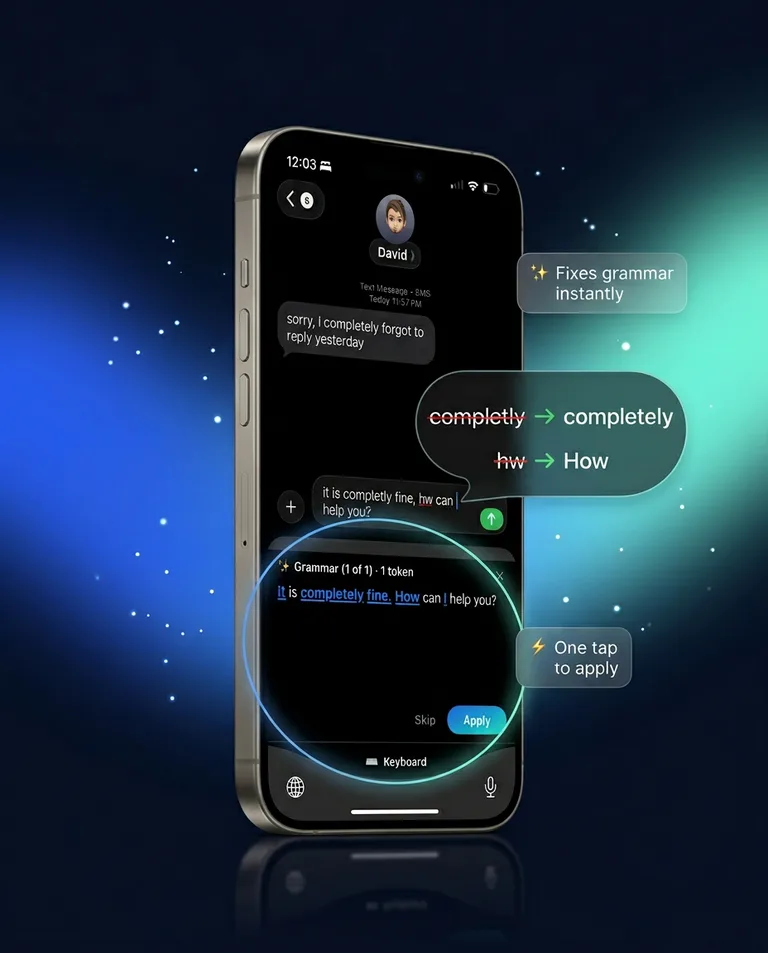
What does on-device spelling cover?
The ordinary path: you type, and spelling, prediction, and word completion happen locally. If a cloud request cannot run, those common fixes can still apply. That is different from a full grammar rewrite, which waits for Assist.
Why is there a chip on the suggestion?
So you can see the path. On-device means the suggestion was processed on the phone. The other state means it was sent for AI. You should not have to guess which one you just accepted.
When is a typo actually a grammar problem?
When the words are real and the sentence is still off: tense, agreement, or a missing word. Assist is built for that pass, and for tone rewrites if you want them. The rewrite page lists formal, friendly, and shorter. The AI grammar keyboard page is the broader version of the same Assist action. Staying in the open app for that grammar pass, with no website in between, is fix grammar with AI.
People writing in a second language often want both layers. That use is described on English texting help, still using the same two taps, not a separate mode.
What never needs to leave the phone?
Typing. Also anything the on-device secret scan blocks before a cloud request, such as card numbers or passwords. Allow Full Access exists so Assist and Reply can reach Claude, not so every keystroke is collected. The privacy policy is the long version. The setup guide is the short one. Product context is on the homepage.
Common questions
Is ReePhly an autocorrect alternative?
It is an extra keyboard, not a patch on Apple's keyboard. You switch to it when you want on-device spelling plus the option to tap Assist. Your system keyboard remains installed.
How do I proofread a text on iPhone?
Read it once yourself, then tap Assist if you want Claude to check grammar and offer a rewrite. Apply only the changes you agree with. Proofreading is that review, not an automatic send.
What happens if I am out of tokens?
Common spelling and contraction fixes can still run on the device. The cloud grammar pass needs a token on the free plan, or Pro, which removes the meter. Wind a collectible, a short rewarded ad, for 5 tokens.