 ReePhly
Everyday English
Grammar Help for Non-Native English Speakers
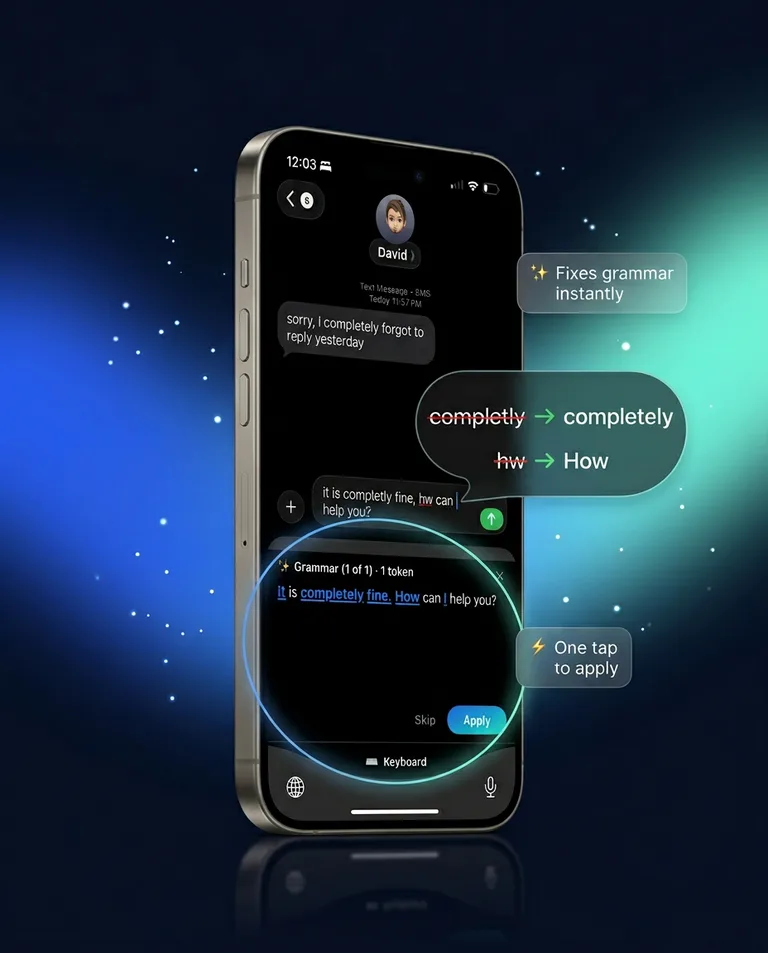
Grammar help for non-native English speakers is a check that the sentence says what you meant, in a tone that fits. ReePhly spells on your iPhone as you type. Tap Assist and Claude can correct grammar or rewrite the line as formal, friendly, or shorter. You still choose what to send.
How do you check a text before you send it?
Type the idea in simple words
A short true sentence is easier to fix than a long one you are unsure of. Spelling, prediction, and word completion run on the device while you type.
Tap Assist for grammar and tone
Assist can correct grammar or rewrite the draft as formal, friendly, or shorter. Formal is useful for work. Friendly is useful when the line sounds colder than you feel. Shorter helps when you over-explained.
Read the suggestion out loud
If a name, time, or refusal disappeared, do not apply that part. The keyboard can propose a line. It does not know which fact you must keep.
What kind of English help is this?
Day-to-day texting help: a typo caught on the device, then a grammar or tone pass when you ask. It is not a course, a dictionary, or a translator. If the sentence is already spelled correctly and still sounds wrong, Assist is the tap. The autocorrect page splits those two layers in more detail.
What if the grammar is fine and the tone is off?
Ask for a rewrite instead of another spelling pass. Formal, friendly, and shorter are the styles the product offers. Work messages often want formal or shorter. A note to someone close may want friendly. The rewrite page is the longer explanation of Assist.
How do you answer in English when you freeze?
Decide the fact first: yes, no, or a time. Then let Reply draft from the message you copied. Samples for a boss, a partner, and a friend, written as plain examples rather than app output, are on how to reply to a text. The mechanics of the Reply tap are on the AI reply keyboard page.
What should you still do yourself?
Keep names, times, and refusals accurate. A fluent sentence that agrees to the wrong plan is worse than a simple sentence that is true. ReePhly shows a suggestion. You apply it.
The AI grammar keyboard page is the general version of Assist. Install steps are the setup guide. What a tap sends is the privacy policy. The homepage is the product in one screen.
Common questions
Is there a separate ESL mode?
No. The same Assist and Reply actions are what you use. There is no translation feature and no language-detection mode described for the keyboard. You write in English, then ask for a grammar or tone pass.
Can it help me answer someone else's text?
Yes, with Reply. Copy their message, tag the person if you saved notes for them, and tap Reply. Edit the draft so it says what you are actually willing to do.
Will my practice sentences be uploaded as I type?
No. Typing stays on the iPhone. Claude receives the draft when you tap Assist or Reply. Allow Full Access is only so those taps can reach the network.