 ReePhly
Contacts
Context-Aware AI Keyboard
A context-aware AI keyboard changes the draft based on who you are writing to, not only the sentence in front of you. In ReePhly you save a relationship, writing notes, and example messages for that person. Tag them and tap Reply, and the draft can follow those notes.
How do you teach it who you are texting?
Create the contact
Save the person in ReePhly. You do not need the system address book for this. The record is one you choose to create.
Set the relationship and notes
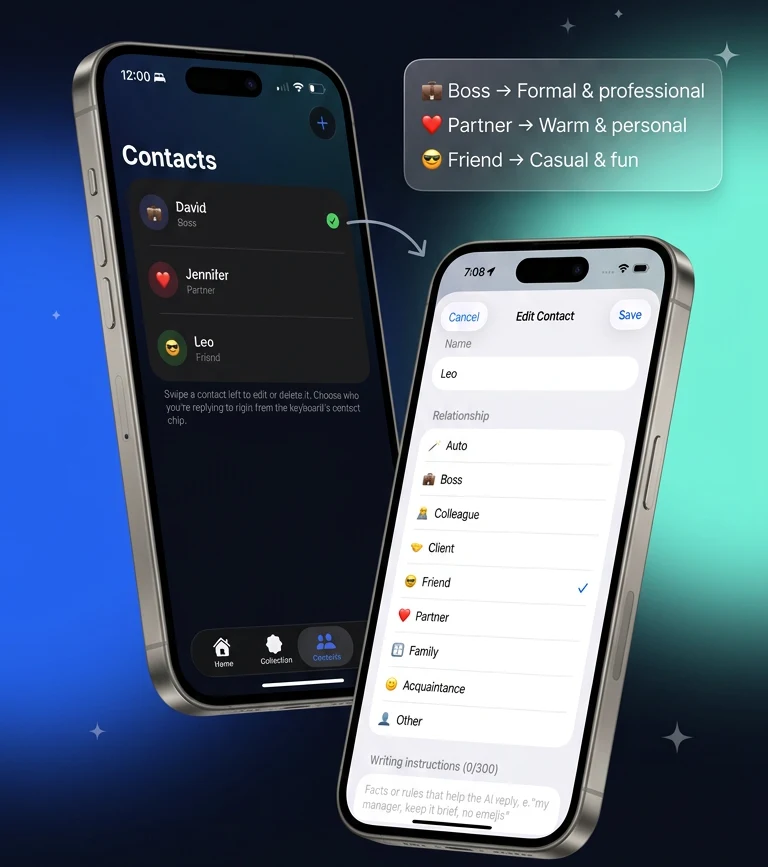
Pick a relationship such as Boss, Partner, or Friend. Add writing notes and a few example messages that sound like you with that person. The contacts screen maps those relationships to different tones.
Tag them, then tap
In the keyboard, tag that contact before Assist or Reply. Claude sees the draft you submit, plus the on-device context included for that request. Untagged taps do not invent a relationship.
What does a tone-aware keyboard remember?
It remembers what you typed into that contact: a relationship label, free-text writing instructions, and example messages. Those are not pulled from iMessage threads. If you never create the record, there is nothing personal to apply.
Where do those notes live?
On the device, by default. Optional backup stores a locked copy that ReePhly cannot read. Your recovery password is never sent to us. Either way, tapping Reply still sends the selected draft, and any contact context included in that request, so Claude can write the suggestion. Details are in the privacy policy.
How is the reply different for each person?
You tag one contact. The draft can follow that contact's notes and examples, so a line to your boss need not reuse the wording you saved for a friend. This is not a second app you paste into. It is the same keyboard, with a different tag.
What if I only want a grammar fix?
Use Assist without leaning on the contact, or tag them if the rewrite should still sound like that relationship. The rewrite page covers formal, friendly, and shorter. The AI reply keyboard covers the copy-then-Reply path these notes are meant for.
Is context the same as reading the room automatically?
No. You choose the person and you choose the tap. A plain reply guide is still worth reading when you are deciding what the message should do. ReePhly applies the notes you saved. It does not watch the thread in the background.
Add the keyboard once using the setup guide, then come back to the homepage if you want Assist and Reply side by side. Grammar-only fixes are on the AI grammar keyboard page.
Common questions
What is a personalized AI keyboard?
Here it means a contact you filled in: relationship, writing notes, and example messages. Tag that contact so Assist or Reply can use those notes. The details stay on the iPhone unless you turn on optional backup.
Does ReePhly read my whole chat history?
No. Reply uses the message you copied. Assist uses the draft you chose. Tagging a contact adds the notes you saved for that person. Nothing is sent to Claude until you tap.
Can a boss and a friend share one tone?
Only if you write the notes that way. The product treats them as separate contacts, and the relationship picker shows Boss, Partner, and Friend as different tone paths. You decide what the notes say.